Xero vs Sage Intacct (2026): Which One Is Right for Your Firm?
Xero vs Sage Intacct (2026): an SMB platform vs a mid-market financial system. Full comparison of features, pricing, and which one fits your firm's complexity.


A practical guide for small businesses and CPA firms on what to look for, what to avoid, and how to choose a platform that holds up as you grow.
Not all accounting software is built for the same job. This guide breaks down the categories, what actually matters when evaluating platforms, and a side-by-side comparison of the most widely used options.
In this article
Most small businesses don't fail because of bad products or poor service. They fail because of cash flow problems, tax surprises, and financial blind spots that could have been caught earlier.
The right accounting software doesn't just keep the books -- it keeps the business alive. But what is good accounting software for a small business, exactly?
The answer means very different things depending on who's asking. A sole proprietor tracking expenses is not asking the same question as a CPA firm managing accounting for dozens of small business clients.
This guide is useful for both: small businesses trying to understand what they actually need, and accounting professionals helping clients make smarter decisions about their financial infrastructure.
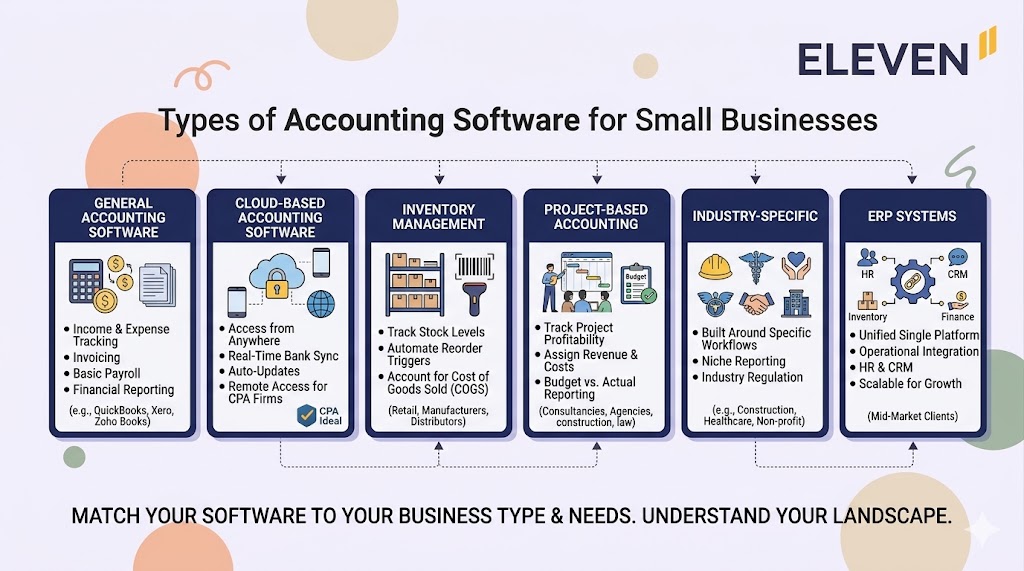
Before comparing specific tools, it helps to understand the landscape. Not all accounting software is built the same way, and choosing the wrong category is as problematic as choosing the wrong product.
This is the broadest category and the starting point for most small businesses. It covers income and expense tracking, invoicing, basic payroll, and financial reporting.
For businesses that don't have complex inventory, project accounting, or multi-entity structures, general accounting software usually covers what's needed. Most of the well-known names -- QuickBooks, Xero, Zoho Books -- fall into this category.
Cloud-based software has largely become the default, and for good reason. It allows access from anywhere, updates automatically, syncs with bank feeds in real time, and eliminates the version control problems that come with desktop software.
For CPA firms managing multiple small business clients, cloud access is not a nice-to-have -- it's a prerequisite. Working in a client's books without being physically present at their office is foundational to how modern accounting firms operate.
If you want to dig into this further, the case for switching to cloud accounting software is worth reading.
Retail businesses, manufacturers, and distributors need software that goes beyond the income statement. Inventory management accounting tools track stock levels, automate reorder triggers, and account for cost of goods sold accurately.
General software handles this to varying degrees, but businesses with significant inventory complexity often need a purpose-built solution or a platform with strong inventory modules.
Service businesses -- consultancies, agencies, construction firms, law practices -- often need to track profitability at the project level rather than just the entity level.
Project accounting software assigns revenue and costs to individual engagements, tracks budgets against actuals, and surfaces which clients or projects are actually making money. For CPA firms with consulting or advisory practices, this matters internally as much as it does for their clients.
Some industries have accounting requirements that general software handles poorly: healthcare billing, construction job costing, nonprofit fund accounting, real estate.
Industry-specific tools are built around those workflows. They're worth considering when a business's accounting complexity is driven more by industry regulation and structure than by size alone.
Enterprise Resource Planning systems combine accounting with operations, HR, inventory, and CRM into a single platform. They're typically overkill for a small business but can become relevant as a business scales.
CPA firms serving mid-market clients transitioning out of small business software often encounter ERP decisions and need to be conversant in that landscape. For a clear-eyed comparison of where accounting software ends and ERP begins, this breakdown of ERP vs. accounting software is a useful reference.
Features are easy to list. What's harder to assess is whether software will hold up in practice -- for the business using it and for the accountants working inside it. Here's what actually matters.
Everything else in a business's financial picture depends on the quality of the underlying bookkeeping. Software that makes it easy to miscategorize transactions, ignore reconciliation, or defer cleanup creates problems that compound over time.
Good accounting software guides users toward clean practices, not away from them. For CPA firms, this means choosing platforms where the bookkeeping structure is sound by design, not just ones that are easy to use.
Automated bookkeeping capabilities matter here: the less manual data entry involved, the fewer opportunities for error.
Generating a profit and loss statement is table stakes. Good accounting software produces reports that are actually useful for decision-making: cash flow projections, accounts receivable aging, margin by product or service line, budget vs. actual comparisons.
The best platforms let you configure these reports without needing to export to a spreadsheet every time.
For CPA firms, standardized reports across clients are what makes it possible to review financial health efficiently at scale, rather than rebuilding the analysis from scratch each month.
Invoicing, payment reminders, bank reconciliation, recurring journal entries -- these are tasks that happen on a schedule and follow predictable rules. Software that automates them saves time and reduces the risk of things falling through the cracks.
For small businesses, automation compensates for having a small team. For CPA firms, it's what makes it possible to serve a large client base without proportionally increasing headcount.
A business's financial data lives in more than one place: the payment processor, the payroll system, the bank, the CRM. Good accounting software connects to these systems rather than requiring manual data transfer between them.
Every manual transfer is a potential error and a delay. The more seamlessly the accounting platform sits at the center of the financial data ecosystem, the more reliable and current the numbers will be.
Financial data is among the most sensitive a business holds. Software should offer encrypted data storage, secure login with multi-factor authentication, and granular user permissions that allow different team members and advisors to access what they need without exposing everything.
For CPA firms, this is especially important. Client data must be protected, and access should be tightly controlled at both the firm and client level.
A small business today may be a mid-sized business in three years. Software that works well at ten transactions a month may buckle at ten thousand.
Scalability means the platform can handle growth in transaction volume, entity complexity, user count, and reporting needs without requiring a disruptive migration. Choosing software that scales eliminates the painful and expensive process of switching platforms at the worst possible time -- when the business is growing fast and has the least capacity to manage it.
Different businesses need different tools. The table below compares options across the dimensions that matter most for small businesses and the CPA firms that serve them.
A few things worth noting. For a solo business owner or a small team with straightforward finances, tools like Xero, Zoho Books, or FreshBooks cover the ground well and are easy to get started with.
For businesses with more complexity -- multiple entities, multi-currency transactions, or a CPA firm managing many clients under one roof -- the limitations of those tools become apparent quickly.
Multi-company accounting software is a different category, built for a different level of complexity, and the distinction matters more than most buyers realize before they hit the wall.
Knowing the options is one thing. Making the right call for a specific business is another. Here's a practical framework.
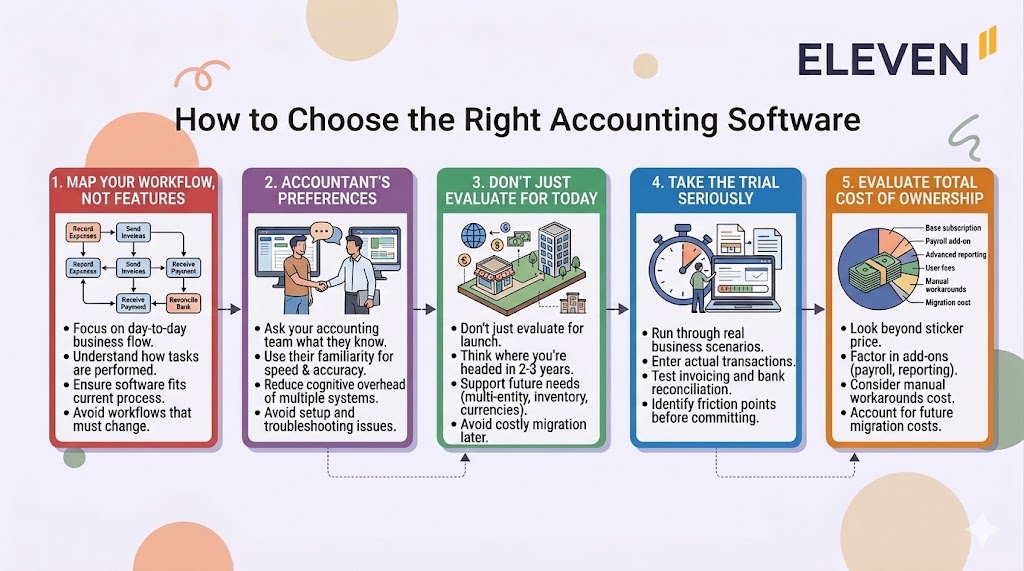
Most software vendors lead with features. What matters more is how the software fits the actual day-to-day of the business. How are expenses currently tracked? How are invoices sent? Who reconciles the bank accounts and how often?
Map the current process first, then evaluate how well each platform supports or improves it. Software that requires the business to change every workflow to fit the tool is software that will be abandoned.
If you work with a CPA firm or bookkeeper, their familiarity with the platform matters. An accountant who knows a system well can catch issues faster, produce better reports, and spend less time on setup and troubleshooting.
It's worth asking your accounting team what they prefer before committing to a platform. Conversely, CPA firms should be deliberate about the platforms they recommend to clients -- standardizing on fewer platforms reduces the cognitive overhead of switching between environments constantly.
A business's accounting needs at launch are rarely the same as its needs two or three years in. Think about where the business is headed: will it add locations or entities? Will it need to manage inventory? Will it start doing business in multiple currencies?
Software that handles today's needs but can't support tomorrow's growth creates a migration problem at the worst possible time. Choose with the next stage of growth in mind, not just the current one.
Most platforms offer a free trial. Use it to run through real scenarios: enter some actual transactions, generate the reports you'd actually need, try the bank reconciliation workflow, test the invoicing process end to end.
A trial that you treat as a live evaluation will tell you far more than a demo. Pay attention to where the software slows you down or requires workarounds -- those friction points don't get better with familiarity.
Sticker price is only part of the picture. Factor in the cost of add-ons that are often sold separately (payroll, advanced reporting, additional users), the time cost of manual workarounds for missing features, and the switching costs if you outgrow the platform in two years.
Cheaper software that requires more manual work or a migration in eighteen months is often more expensive in total than a more capable platform at a higher monthly rate.
Everything above applies to a small business choosing software for itself. CPA firms evaluating platforms on behalf of clients -- or choosing a platform for managing multiple client accounts -- have a different set of considerations.
The core question for a CPA firm is not just "does this software work for this client?" but "does this software work within the way our firm operates?"
That means thinking about how many clients will use the platform, how staff will move between client accounts, what reporting standardization is possible, and how the platform handles the firm's own workflows alongside client work.
Firms that standardize on a single platform for a large portion of their client base get better at that platform faster, build better internal processes around it, and can invest in deeper automation.
Firms that manage clients across many different platforms spend a disproportionate amount of time on context-switching and system-specific troubleshooting.
Accounting software built specifically for CPA firms addresses these operational realities in ways that generic small business software doesn't.
The other critical consideration for firms is multi-entity capability. Many small business clients have more complexity than they appear to at first glance: a holding company, an operating entity, a real estate LLC. Software that handles each of these in isolation creates consolidation work that could otherwise be automated.
For firms managing clients with any degree of entity complexity, multi-entity accounting capability should be a primary criterion, not an afterthought.
Good accounting software for small businesses does three things well: it keeps financial records accurate, it produces reports that are actually useful, and it doesn't create more work than it saves.
Beyond that baseline, the right choice depends entirely on the specific business -- its size, structure, industry, growth trajectory, and the accounting team supporting it.
For small business owners, the takeaway is to choose software that fits where you are going, not just where you are. For CPA firms, the takeaway is to think about your platform choices at the firm level, not just the client level -- because consistency and scalability in how you operate directly affects the quality of service you can deliver.
If you're managing multiple small business clients and hitting the ceiling of what your current tools can handle, Eleven was built for exactly that situation.
A cloud accounting platform designed for CPA firms and family offices, it consolidates multi-entity financials, automates repetitive bookkeeping tasks, and produces standardized reports across your entire client base.
Try it free at runeleven.com/test-drive -- no sales call required.

Related content



We are using cookies. Learn more.