Benefits of Cloud Accounting for Small Businesses: What CPAs and Financial Professionals Need to Know
A practical guide for CPA firms and family offices on what cloud accounting actually delivers, what it costs, and how to evaluate whether a platform was built for your level of complexity.
Cloud accounting is growing fast and your clients are already moving in that direction. The firms getting ahead are the ones leading that conversation, understanding what the technology actually delivers, where it falls short, and whether the platform they recommend was built for professional complexity or just marketed that way.
In this article
The cloud accounting software market was valued at $23.11 billion in 2024 and is on track to hit $87.22 billion by 2035.
That kind of growth does not happen unless businesses are actually switching. Your clients are moving in this direction, and the firms getting ahead are the ones leading that conversation rather than reacting to it.
This guide breaks down what cloud accounting actually delivers, where it falls short, and what it means specifically for your practice if you are managing multiple client entities.
What Is Cloud Accounting?
Cloud accounting software hosts financial data on remote servers and delivers access through a browser or app rather than a locally installed program.
Every transaction, report, and reconciliation happens in a shared, always-current environment that any authorized user can access from any device with an internet connection.
For your small business clients, this typically replaces a desktop copy of QuickBooks or a folder full of spreadsheets.
For your firm, it replaces the fragmented workflow you probably know too well: emailed files, network drives, and software that lives on one machine that only one person can use at a time.
The 5 Core Benefits of Cloud Accounting for Small Businesses
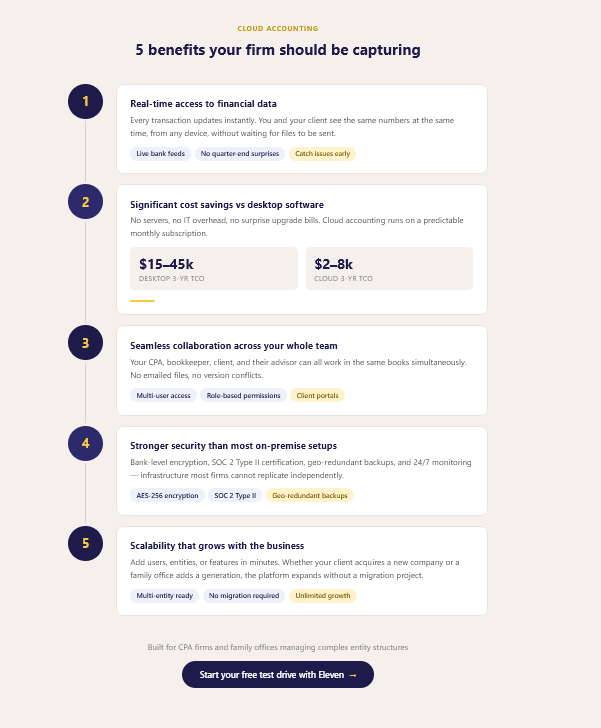
1. Real-Time Access to Financial Data
Think about the last time a client called with an urgent question and you had to tell them you would get back to them once you pulled the file. With cloud accounting, that conversation changes entirely.
Traditional desktop accounting creates a lag between when transactions happen and when anyone can see them. Data has to be entered, saved, and physically accessed on the machine where the software lives. Cloud accounting eliminates that lag.
Every bank transaction, invoice, and expense entry updates in real time, so you and your client are always looking at the same numbers, whether you are in the office or they are calling from their car.
For your practice, this means you can monitor client financials continuously rather than receiving a batch of files at quarter-end and reconstructing what happened.
You catch issues before they become problems. You show up to client meetings ready to talk strategy instead of spending the first half reconciling discrepancies, especially when using an AI meeting assistant to capture the details
What this looks like in practice: You notice a client's accounts receivable has aged significantly and flag it before it becomes a cash flow crisis, not three months later when the books are finally closed.
2. Significant Cost Savings Compared to Desktop Software
If you are helping clients evaluate whether to make the switch, the cost argument is one of the easiest ones to make. The savings are real, and they compound over time. Here’s an overview:
Cost Category
Desktop Software
Cloud Accounting
Initial license / setup
$2,000 – $8,000+
$0 – $500
Annual updates & maintenance
$500 – $2,000/yr
Included
IT infrastructure & servers
$3,000 – $15,000
None
Per-user licensing (5 users)
$1,500 – $5,000/yr
$600 – $2,400/yr
Data backup & disaster recovery
$500 – $3,000/yr
Included
Estimated 3-year TCO (5 users)
$15,000 – $45,000
$2,000 – $8,000
The subscription model also helps your clients manage cash flow. A predictable monthly cost is easier to plan around than surprise upgrade cycles and emergency IT calls. And for your firm, lower software costs mean fewer barriers to getting new clients onto a platform that actually supports the kind of collaborative work you want to be doing with them.
3. Seamless Collaboration Between Business Owners, Accountants, and Advisors
If you have ever had to email a file back and forth three times before a review was complete, you already understand the problem cloud accounting solves here.
Desktop software was built for one user at one desk. Cloud accounting was built for teams.
Multiple people can access the same books simultaneously, so you, your staff accountant, your client's bookkeeper, and their tax advisor can all work in the same environment without file conflicts, version control headaches, or anyone waiting their turn.
Adjusting entries, workflow notes, and document attachments live right alongside the transactions they relate to.
For your senior team, this means being able to review work in progress without interrupting whoever is doing it. For your staff, it means being able to flag questions in context rather than sending emails that fall through the cracks.
And for your clients, it means they can see the reports that are relevant to them without seeing anything they should not.
What to look for: Platforms built for professional firms offer role-based access controls granular enough to match real organizational structures, not just "admin" and "viewer" toggles.
4. Stronger Security Than Most On-Premise Setups
This is the objection you will hear most often: "I want our data on our own server where I can control it." It feels safer. But in most cases, it is not.
A typical on-premise server relies on whatever security measures the business or firm has put in place on its own: a firewall, maybe a backup drive, perhaps antivirus software.
Reputable cloud accounting platforms invest in security infrastructure that most firms simply cannot replicate independently:
AES-256 encryption for data at rest and in transit
SOC 2 Type II certification (independently audited security controls)
Geo-redundant backups with point-in-time recovery
Multi-factor authentication and audit trails on every action
Full-time security monitoring and rapid incident response
Your on-premise server can be stolen, destroyed in a fire or flood, hit with ransomware, or fail without a tested recovery process. Cloud providers are solving for all of these risks as core infrastructure, not afterthoughts.
When you are handling sensitive client financial data, this is not just a nice-to-have. It is part of your professional responsibility. And if you are working with family offices, you need permission structures granular enough that individual family members see only their own data, not the whole picture.
5. Scalability That Grows With the Business
Your clients' needs today are not what they will be in three years.
Businesses add employees, open new locations, restructure, and grow in directions nobody predicted. Desktop software does not handle that gracefully.
More users mean more licenses, more seats, often more machines, and eventually a migration project at the worst possible moment.
Cloud platforms scale on demand. Adding a user, provisioning a new entity, or upgrading a plan takes minutes rather than weeks. Storage expands automatically. Features like payroll, inventory tracking, or multi-currency support can be activated when a client actually needs them rather than purchased speculatively upfront.
For your firm, this matters in both directions. Your clients can grow without outgrowing the tools you have set up for them, and you can take on more clients without rebuilding your workflows from scratch each time.
As the next generation becomes involved and new entities are created, new trusts, LLCs, investment vehicles, the accounting infrastructure needs to expand cleanly. Cloud platforms make that possible without forcing a system overhaul at an already complicated moment.
What Cloud Accounting Does Not Solve
You deserve a straight answer on the limitations, not just the highlights:
Internet dependency: Cloud accounting requires connectivity. Most professional environments have reliable internet, and most platforms offer some offline functionality, but confirm this before you commit on behalf of a client.
Ongoing subscription costs: Unlike a one-time software license, subscriptions are a recurring cost. Over a long enough period this can look more expensive than an equivalent desktop license, though that comparison typically ignores the IT, maintenance, and upgrade costs that cloud eliminates. Make sure your clients are doing the full math.
Data portability: Before committing to any platform, confirm you can export data in a usable format. Some platforms make this easy. Others make it deliberately difficult. Ask before you sign, not after.
Not every cloud platform was built for professional complexity: Many cloud tools were designed for business owners doing their own bookkeeping and have been stretched to serve professional firms through workarounds. Multi-entity management, consolidated reporting, trust accounting, and investment tracking are often weak spots. The feature list may look complete in a demo while the actual workflow falls apart in practice. This is the one to watch out for.
Is Cloud Accounting Right for Your Firm?
The case is strongest when you can check most of these boxes:
We manage more than five client entities or family entities simultaneously
Multiple team members need access to the same books at the same time
We spend meaningful time on manual reconciliation or file management each week
Clients are asking for real-time financial visibility or portal access to their own data
We do not have a tested disaster recovery plan for our financial data
Our team works across multiple locations or remotely
Growth is outpacing what our current system can cleanly handle
We are still emailing files or working from a shared network drive
If four or more apply, you are probably already feeling the friction. Cloud accounting does not just reduce it, it eliminates most of it.
How to Evaluate a Cloud Accounting Platform as a CPA Firm or Family Office
Most cloud accounting platforms were not built with your workflows in mind.
They were built for business owners managing their own books, and everything else was added later. When you are evaluating options, that distinction matters more than any feature list.
For professional firm use, three things are non-negotiable.
First, multi-entity management with true consolidated reporting, not separate logins you have to manually reconcile.
Second, trust and estate accounting support, including distribution tracking and beneficiary reporting.
Third, role-based access controls granular enough to match your actual org structure and the confidentiality requirements that come with it.
Beyond those, look closely at:
Client portal functionality so your clients see their own data without ever touching yours
Full audit trails on all transactions, edits, and user activity
Tax software integration with the platforms your firm already uses
SOC 2 Type II certification, not just a security FAQ page
Clean data export in formats you can actually use if you ever need to move
Eleven is built specifically for CPA firms and family offices. These are not premium add-ons or third-party integrations. They are core features, because for your clients, they are not optional.
Key Takeaway
The benefits of cloud accounting for small businesses are well established: real-time data, cost savings, better collaboration, stronger security, and the ability to scale.
But what those benefits mean for your practice is a different question.
If you are still managing client books the way you were five years ago, the gap between that workflow and what cloud accounting makes possible is probably larger than you think.
Not because the tools are magic, but because the friction you have normalized, the file requests, the version confusion, the single-machine bottlenecks, is genuinely optional at this point.
The platforms that work best for professional firms are not the same ones marketed to small business owners. Make sure whatever you evaluate was actually built for the complexity your clients bring, not retrofitted for it.
Eleven is a cloud accounting platform built for CPA firms and family offices. See it in action with a free test drive at: runeleven.com/test-drive
Frequently Asked Questions
Is client financial data safe in the cloud?
Yes, on reputable platforms. Look for AES-256 encryption, SOC 2 Type II certification, role-based access controls, and geo-redundant backups. In most cases this exceeds the security posture of an on-premise server in a typical office environment.
What happens if the internet goes down?
Most platforms offer offline functionality or mobile apps with local caching. Brief outages are manageable, and work done offline syncs when connectivity resumes. It is worth testing this during your evaluation.
Can we manage multiple client entities in one platform?
On platforms built for professional firms, yes, with proper data segregation, consolidated reporting, and role-based access so each client sees only their own data. On small business platforms stretched to serve firms, this is typically where things break down.
How difficult is migrating from desktop software?
Most migrations take two to six weeks depending on data complexity. The key is preparation: clean up your existing books before you migrate, run both systems in parallel for a few weeks, and time the cutover to your quiet season. Do not attempt this mid-tax-season.
Does cloud accounting work for family offices with complex structures?
Modern platforms built for this use case support trust accounting, multi-currency, investment portfolio tracking, and consolidated family reporting across entities. Generic small business platforms typically do not, even when they claim to.
What compliance standards should we verify?
SOC 2 Type II is the baseline. For family offices, ask about FINRA or SEC reporting support where relevant, and confirm GDPR compliance if you have international clients.
Noel Bouwmeester is an SEO content strategist and B2B SaaS writer focused on organic growth, search visibility, and AI-era content discovery. He has contributed to SEO and content marketing initiatives for companies including lempire and lemlist, helping support large-scale organic traffic growth through search-focused content strategies. At Eleven, he contributes educational SEO content focused on accounting technology, automation, and AI-driven business workflows.


.webp)


.avif)