Odoo Accounting Review 2026: Features, Pricing, Pros and Cons
In-depth Odoo Accounting review covering features, pricing, and pros and cons to help you decide if Odoo is right for your accounting needs.
This Odoo Accounting review explains how the platform reduces manual accounting work through automation. It covers features, pricing, strengths, and limitations to see if Odoo is right for your business.
In this article
Nearly 40% of accountants still spend half their working day on manual tasks like data entry and record keeping.
Choosing the right accounting platform can reduce that workload and improve efficiency.
This Odoo Accounting review outlines what the software offers, its key strengths, and the limitations you should be aware of. It will help you decide whether Odoo is the right fit for your business.
What Is Odoo Accounting Software?
Odoo Accounting is one of the financial modules within the Odoo ERP ecosystem. It connects your bookkeeping and finance workflows with other operational tools.
Businesses can link accounting with Sales, CRM, Inventory, Website, Manufacturing, and HR, which creates a centralized data environment instead of separate systems.
The platform supports international operations through Fiscal Localization Packages. These packages provide country-specific tax rules, chart of accounts, and legal statements so businesses can work in different regulatory environments.
Odoo can also be used as a cloud solution or deployed on-premise, which makes it flexible for different IT setups.
Payroll is available in Odoo but requires its own module. It is not part of the standard Accounting app.
Odoo Accounting Features
Odoo’s accounting module includes a wide set of tools designed to automate manual work and keep financial records accurate. Here are some of them:
AI-Powered Invoice Digitization
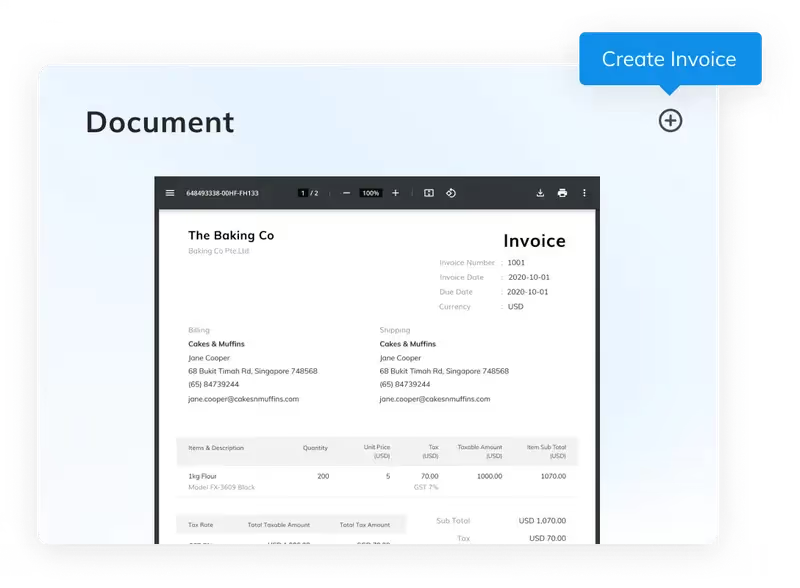
AI-driven document scanning that extracts data from invoices and bills. The system reads PDFs or image files and fills in the necessary fields. Users only need to review and confirm the data. Odoo promotes very high recognition accuracy, although real performance can vary based on document quality and formatting.
Smart Bank Reconciliation
Bank statements can be imported automatically through connections with thousands of financial institutions or by uploading OFX, QIF, CSV, or CODA files. Odoo’s matching engine suggests reconciliation entries and speeds up the process significantly. Users often highlight this feature as one of Odoo’s strengths.
Multi-Currency and Global Workflows
Businesses operating in different regions can manage multi-currency transactions, intercompany exchanges, and consolidated financials. Currency rates can be updated daily.
Accounts Receivable and Payable Automation
Odoo can automate reminder messages for overdue invoices through email, letters, and SMS. On the payables side, it supports SEPA credit transfers, batch payments, and check printing.
Financial Reporting and Tax Management
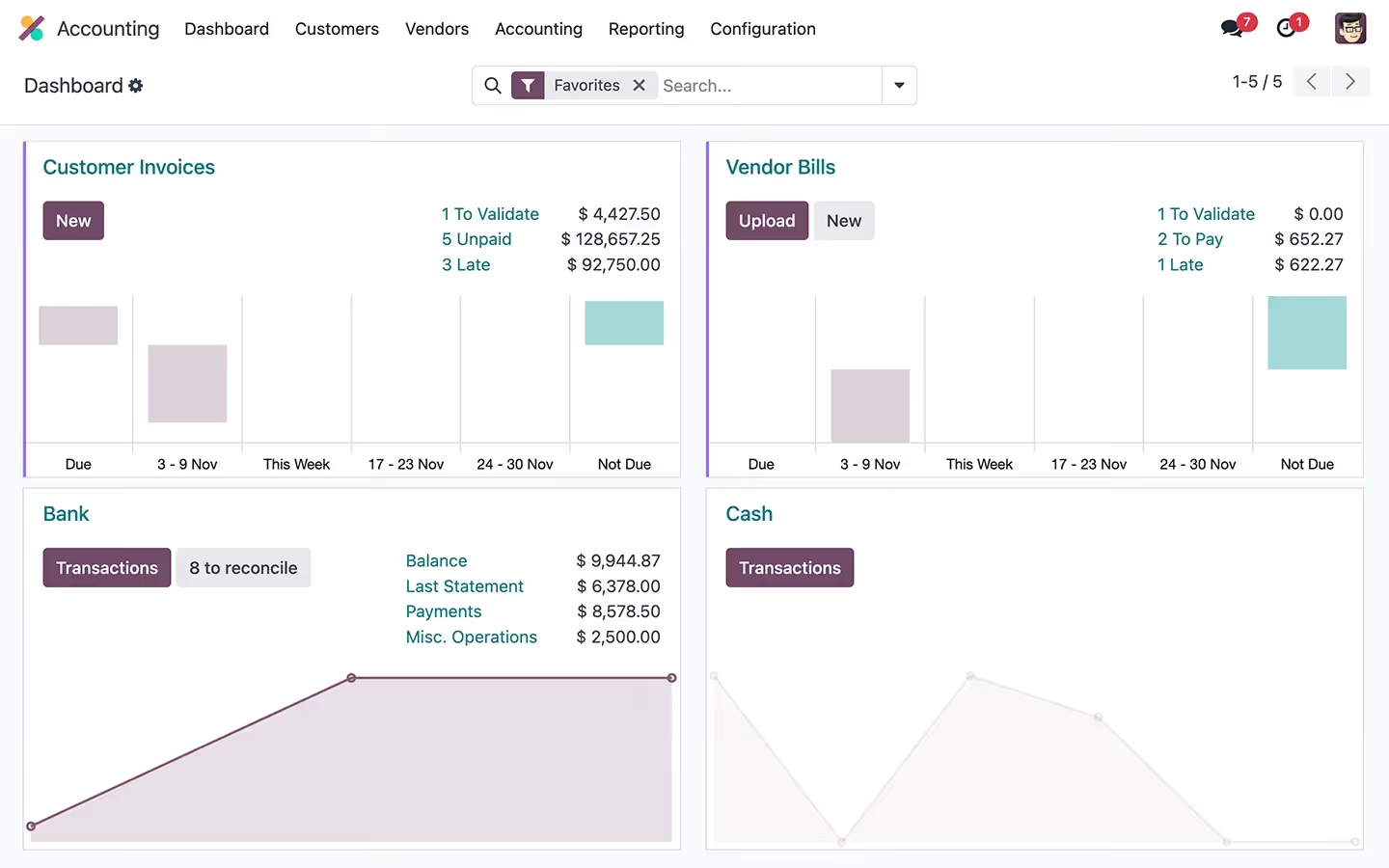
Real-time dashboards and reports provide visibility into revenue, expenses, cash flow, and profitability. The tax engine supports a variety of tax types and configurations. Businesses can generate tax reports formatted according to local requirements and take advantage of electronic invoicing formats like Peppol.
Analytical Accounting in Odoo
Analytical accounting is one of Odoo’s most valuable tools for deeper financial insight.
It allows businesses to understand where money is coming from and where it is going. It lets teams track income and expenses by department, project, or cost center, giving a clearer view of how different parts of the business perform.
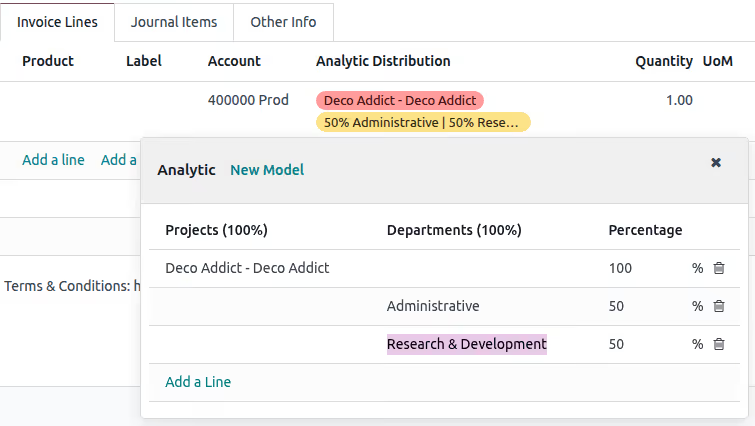
Odoo structures this through analytic plans and analytic accounts. Plans define the categories you want to track, and the accounts hold the values assigned to each category.
The Analytic JS widget makes it easy to split costs or revenues directly from invoices or bills, and templates help speed up repeat entries.
Users can monitor budgets, review performance in different scenarios, and update analytic items in bulk. This is useful for companies that need detailed cost analysis and better visibility into profitability.
Odoo Pricing
Odoo offers several pricing options designed to fit different types of businesses. Prices may vary depending on region and billing frequency, but the structure remains consistent.
Below is a breakdown of Odoo’s main plans and what each one includes.
Plan
Price
Key Details
One App Free Plan
Free
Use one Odoo app with unlimited users. Hosting and basic support included at a limited level. Any required related apps are provided at no extra cost.
Standard Plan
$9.10 per user/month
Access to all Odoo apps with Odoo Online hosting. Priced per user per month. Best suited for companies operating fully in the cloud without custom development needs.
Custom Plan
$13.60 per user/month
Includes everything in the Standard plan plus Odoo Studio, multi-company features, and external API access. Supports Odoo Online, Odoo.sh, or on-premise hosting. Designed for businesses needing custom workflows or self-hosting.
All paid plans include daily backups on multiple continents, email integration, security monitoring, and access to the Odoo eLearning library.
What Users Say About Odoo Accounting
⭐⭐⭐⭐ Ratings
G2 4.3/66
Reviews from G2 and other platforms show a balanced picture
Many businesses value Odoo for its integration across departments. Instead of managing separate systems for CRM, sales, inventory, and accounting, everything connects in one place.
Users often mention that automation reduces manual work and increases visibility across the company. Flexibility is another common point of praise because Odoo can be shaped to match the way each business operates.
The biggest challenges users report relate to setup, navigation, and the need for technical support during customization.
Some reviewers also mention dependency on third-party implementers, which can vary in quality.
Pros of Odoo Accounting
Odoo Accounting offers several advantages that make it appealing to growing businesses, especially those that want more connected financial workflows.
✅ Integrated with the full Odoo ecosystem: The accounting module works directly with CRM, sales, inventory, manufacturing, HR, and other apps. This removes the need for multiple disconnected systems.
✅ Strong automation for routine work: Features like AI invoice digitization, automated reconciliation, batch payments, and automated follow-ups help reduce manual entry and repetitive tasks.
✅ Flexible for different business structures: Odoo supports multi-currency, multi-company setups, and global operations through localization packages.
✅ Customizable workflows: The Custom plan includes Odoo Studio, which allows teams to adapt forms, fields, and workflows.
✅ Useful analytical accounting features: Businesses that need detailed cost tracking benefit from Odoo’s analytic plans, analytic accounts, budgeting tools, and multi-dimensional reporting.
✅ Cost-effective for single-company use: When used within one organization, Odoo’s pricing can be competitive compared to systems that charge extra for modules, add-ons, or hosting.
Cons of Odoo Accounting
Although Odoo is powerful and integrated, there are some points to consider before choosing it.
❌ Initial setup takes time: New users often find the setup process complex. Because Odoo can be customized extensively, configuration requires careful planning. Businesses coming from simpler systems may need support from an implementation partner.
❌ Learning curve: The interface is modern but can feel unfamiliar to users who are used to QuickBooks, Xero, or Sage. Some workflows are not immediately obvious and take practice to learn.
❌ Handling of foreign currency transactions : Odoo is often criticized for its lack of automated, auditable FX revaluation workflows, weak support for realized vs. unrealized gains/losses
❌ Localization quality varies: Odoo provides localization packages for many countries, but coverage is stronger in some regions than others. Companies operating in countries with complex tax systems may need help from an Odoo partner to configure the environment correctly.
❌ Performance for large data sets: Some users on review platforms report slowdowns when generating very large reports or handling heavy transaction volumes. Performance depends on hosting, database size, and customizations.
❌ Limited and coarse-grained roles and access rights model, which makes it difficult to properly enforce segregation of duties, define fine-grained permissions, and meet internal control or audit requirements in complex organizations.
❌ Advanced customization usually requires a developer: Odoo is highly customizable, but more advanced changes usually need technical expertise. Businesses without in-house developers may rely on external partners for adjustments.
❌ Pricing can increase as teams grow: Odoo uses a per-user pricing model. This works well for most companies but can become costly for accounting firms or groups that manage many entities with multiple user roles.
Is Odoo Accounting Worth It?
Odoo Accounting is a strong choice for small and mid-sized businesses that want integrated workflows, automation, and flexibility. It is especially useful for businesses planning future growth because modules can be added as needs evolve.
The system works best when companies have the resources to handle the initial setup or when they work with an experienced Odoo partner.
For firms that want a simple, out-of-the-box accounting solution without customization, Odoo may feel heavy or complex.
For accounting practices managing many clients, the per-user pricing model can also limit scalability.
An Alternative Worth Considering
Eleven is a cloud-based accounting platform built specifically for accounting professionals and family offices. It uses per-accountant or per-entity pricing, which avoids the cost increases seen in per-user systems.
The platform includes automated bank reconciliation, integrated document management through Dokmee, support for more than 170 currencies, and workflows created around how accountants work in practice.
If you need accounting software that grows with your client base and keeps processes simple as your portfolio expands, book your demo with Eleven now.
Noel Bouwmeester is an SEO content strategist and B2B SaaS writer focused on organic growth, search visibility, and AI-era content discovery. He has contributed to SEO and content marketing initiatives for companies including lempire and lemlist, helping support large-scale organic traffic growth through search-focused content strategies. At Eleven, he contributes educational SEO content focused on accounting technology, automation, and AI-driven business workflows.






.avif)