Accounting Data Backups: What You Need to Know Before It's Too Late
Does your accounting firm already have a reliable data backup strategy? If no, read why backups are essential for accounting software and how to prevent data loss effectively.
An essential guide about the importance of data backup for accounting software and the best practices to protect your financial information.
If all your accounting data is stored in one place, a single hardware failure, accidental deletion, or ransomware attack could cause major problems.
This guide explains what you need to know about accounting data backups and helps you set up a system that works when you need it.
What Does “Backing Up” Actually Mean
A backup is a copy of your data stored somewhere separate from your main system. If your main system goes down, you restore from the backup.
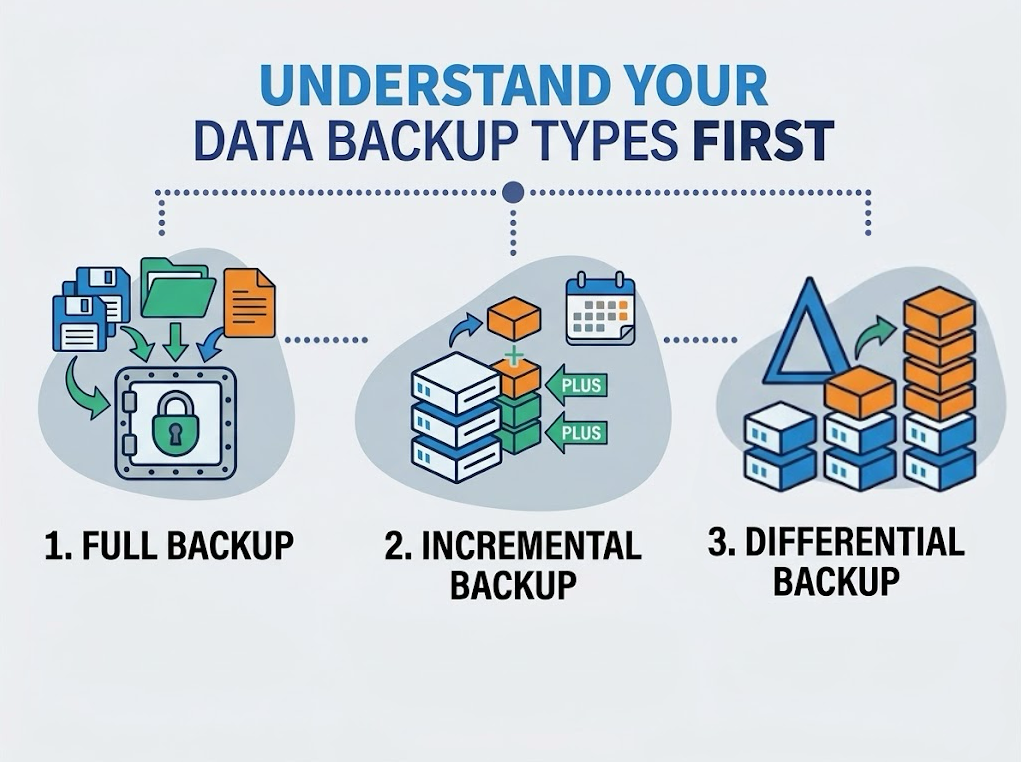
While the idea is simple, it is easy to overlook in practice. There are 3 main types of backups you should know about:
Full backup: This is a complete copy of all your data. It takes longer and uses more storage, but it includes everything.
Incremental backup: This saves only the changes made since the last backup. It is faster and uses less storage, but you need all previous backups to restore your data.
Differential backup: This saves changes made since the last full backup. It is a middle ground between full and incremental backups.
Most firms use a combination of these methods. For example, a weekly full backup combined with daily incremental backups is a common and effective approach.
Why Accounting Data Backup Actually Matters
Data loss can happen in seconds. A cyberattack, hardware failure, or accidental deletion can quickly erase critical financial records.
Without a backup system, recovery is impossible. You could face financial penalties, legal issues, and major disruptions to your operations.
Financial and legal fallout
Missing or unrecoverable financial records can lead to regulatory fines, failed audits, and client disputes. If you cannot provide accurate books when needed, it becomes a compliance problem, not just a technical one.
Operational disruption
When data disappears during your workflow, everything comes to a halt. Payroll, invoicing, and reporting cannot continue until the data is restored. The longer the downtime, the greater the impact.
Cyber threats and ransomware cloud
Cybercriminals often target accounting firms because financial data is valuable. Ransomware attacks can encrypt your files and demand payment for their release. Without a recent backup, paying may be your only option, but there is no guarantee you will recover all your data.
Here is a straightforward way to consider backup frequency:
Daily backups are the standard for active accounting work. Backing up less frequently means you risk losing an entire day's worth of transactions if something goes wrong.
Real-time or continuous backups are useful if you process large volumes of transactions across multiple entities. Otherwise, any data entered since the last backup could be lost.
Weekly full backups, combined with daily incremental backups, provide reliable restore points without using too much storage.
The rule of thumb in data protection is the 3-2-1 rule: 3 copies of your data, on 2 different storage types, with 1 stored offsite.
Not all data is the same. Accounting data is especially sensitive because it relates to compliance, client trust, and regulatory deadlines. If it is lost, you cannot simply recreate it.
If you factor in potential regulatory fines, most firms would struggle to recover from such losses.
The risk is not only from outside threats. Hardware failures cause 40% of data loss incidents, while human error is responsible for another 29%.
In other words, many of the biggest risks come from within your own office.
Most data loss is not dramatic. It is not always caused by a hack or a major server failure. Often, it results from something minor.
What is concerning is that this can happen to firms of any size. Without a proper backup, recovery can be extremely slow or even impossible. Here’s what puts accounting data at risk:
Human error (accidental deletion or edits)
Hardware failure
Software crashes or corruption
Cyberattacks
Natural events like floods or power outages
The good news is that all of these issues can be recovered from, but only if you have backed up your data correctly.
If you’re managing a growing portfolio of client entities, Eleven's document management feature keeps all your financial documents centralized, organized, and accessible in one place.
Local vs. Cloud Backups: What’s the Difference?
Both options have their advantages. Here is a straightforward comparison.
Local backups:
Stored on physical devices such as external hard drives, servers, or USB drives. They are quick to access and do not require an internet connection.
Cloud backups:
Stored offsite via a cloud provider. Accessible from anywhere, but not automatically safe.
Best practice:
Combine local and cloud backups to balance accessibility, security, and redundancy. This approach is often referred to as the 3-2-1 rule.
Keep three copies of your data, on two different types of storage, with one copy stored offsite or in the cloud. While this may sound complicated, once it is set up, the process is mostly automatic.
Every accounting firm has unique needs. The backup strategy for a small two-person practice will differ from that of a firm managing 200 client entities. Here is how to determine what fits your situation.
Start with these three questions:
How much data are you managing? High transaction volumes require scalable solutions that will not become overloaded or slow down.
What is your budget? Cloud backups involve ongoing subscription costs, but they usually provide stronger protection than a one-time local setup.
What are your compliance requirements? Depending on your industry or location, certain regulations may determine how your data must be stored, encrypted, and retained.
Then pick your storage model
Local backup is effective if you need quick access to your data and have reliable on-site infrastructure to support it.
Cloud backup is a better choice if security and off-site protection are your main concerns, especially for firms facing cyber risks or working with remote teams.
Hybrid backup combines both methods. It offers the speed of local access and the resilience of cloud storage, making it a well-rounded option for most accounting firms.
What a Good Accounting Backup Strategy Looks Like
Backing up your data is only part of the process. The other important step is ensuring you can restore it when needed.
More than 60% of organizations believe they can recover within hours after downtime, but only 35% actually achieve this. The gap is usually due to poor planning or untested backups.
A solid backup strategy covers these bases:
Regular testing: Run restore tests at least every quarter. A backup that fails during a crisis is as useless as having no backup at all.
Clear recovery time objectives: Determine how long your firm can operate without access to accounting data. For most firms, this period is very short.
Role-based access controls. Limit who can delete or modify data.
Documentation: Write down your backup process so that anyone on your team can follow it if needed.
What a Solid Backup Policy Should Cover
A backup is more than just a scheduled task; it is a policy. This means documenting the process, assigning responsibility, and testing it regularly.
Your backup policy should answer these questions:
What data gets backed up? (client files, ledgers, invoices, configurations)
How often?
Where is it stored?
Who is responsible for monitoring it?
How do you test that backups are actually working?
How do you restore data if something goes wrong?
Testing is often overlooked by many firms. A backup that has never been tested is only an assumption, not a guarantee. Run a restore drill at least once a quarter to make sure your backups work when needed.
Having a backup is not enough by itself. It must be reliable, secure, and recoverable when needed. Here is what a strong backup practice involves.
Back up frequently: Daily backups are the minimum standard for any active accounting operation. If you handle high transaction volumes for multiple clients, real-time or continuous backups are a good investment. The less time between your last backup and a data loss event, the better.
Encrypt everything: Sensitive financial data should be protected both when stored and when transmitted. Use encryption along with multi-factor authentication and role-based access controls to ensure only authorized people can access the data.
Automate the process: Manual backups get skipped. They get forgotten. Automating your backup schedule removes human error from the equation entirely and makes the whole process consistent and hands-off.
Test your recovery plan: A backup you've never tested is a backup you can't trust. Run restore tests regularly to confirm that recovery is fast, complete, and actually works under pressure.
Use multiple storage locations: Do not store all backups in one place. Keep one backup on local or internal servers and another offsite, such as in a secure data center or with a cloud provider. If one location fails, the other can be used for recovery.
How Cloud Accounting Software Supports Data Protection
If you use spreadsheets or desktop accounting software, your backup challenges increase. Files are saved locally, versions may be overwritten, and there is no automatic record of changes.
Cloud-based accounting platforms handle a lot of the risk at the infrastructure level.
Data is stored offsite, often with built-in redundancy, and most reputable platforms maintain encryption standards.
Eleven uses AES-256 encryption at rest and TLS 1.3 in transit, with role-based access controls and audit logs on every transaction.
However, using the cloud does not make your data invincible. Enterprises that use third-party SaaS backup solutions recover from incidents 45% faster than those that rely only on vendor retention policies. It is still worthwhile to have your own backup system in addition to your platform.
Ready to Build a More Resilient Accounting Setup?
A strong backup strategy begins with a solid foundation. If your accounting data is spread across spreadsheets, separate tools, or manual processes, no backup system can fully protect you.
Eleven is designed for accounting firms that manage multiple client entities. It offers centralized data, automated workflows, and audit-ready controls, reducing risk and making recovery easier when needed.
Schedule a personalized demo to see how Eleven can help your firm protect its most important data.
Camelia Khadraoui is a content writer, illustrator, and former journalist specializing in educational content, visual storytelling, and digital communication. She has contributed to projects for organizations including UNDP and TE Connectivity. At Eleven, she helps create accessible content and visual materials focused on accounting technology, automation, and AI-powered business workflows.


.jpg)



.avif)