In this QuickBook review we breakdown the most popular QuickBooks products and analyze pros and cons to help you decide if it is the right accounting software for you.
Designed primarily for small and medium-sized businesses, QuickBooks provides cloud-based and desktop accounting solutions. This article explores QuickBooks’ main products, including QuickBooks Online, Solopreneur, Payroll, Time, and Desktop Enterprise.
In this article
It is estimated that over 7 million people use QuickBooks.
However, over 2 million users combine QuickBooks with other accounting tools.
With this QuickBooks review, our goal is to help you decide if it’s a good option for you or if you would benefit from another accounting software so you don’t need to pack your tool stack.
What is QuickBooks?
QuickBooks ia a popular collection of accounting products developed by Intuit.
Although it is commonly referred to as “an accounting software,” QuickBooks offers a collections of multiple separate software or applications, each for a specific need, for example, accounting, payroll, or bookkeeping.
The platform’s primary purpose is to help SMBs to manage bookkeeping and handle financial records and payments without risking compliance with tax and reporting requirements.
The QuickBooks product collection includes some simple tools designed for solo operators and other advanced desktop apps for more complex inventory or job-costing environments.
QuickBooks' Main Products
Each QuickBooks product is designed for specific tasks and businesses, so understanding the difference between them is the first step if you’re considering this brand.
Although there are more products and small apps, these are the most relevant products:
It is available in 4 tiers that range from $24 to $75 per month. Each tier adds more sophisticated features such as multi-user access, advanced reporting, inventory management, or workflow automation.
QBO is designed for small to medium-sized businesses that need flexible access to their financial data from any location and prefer automated, real-time bookkeeping tools.
QuickBooks Online is typically used by service providers, consulting firms, e-commerce sellers, small retailers, contractors, hospitality businesses, and startups.
For example, a small consulting firm with five employees uses QBO Essentials to manage recurring invoices, track billable hours through linked apps, and collaborate with an external bookkeeper who accesses the file remotely.
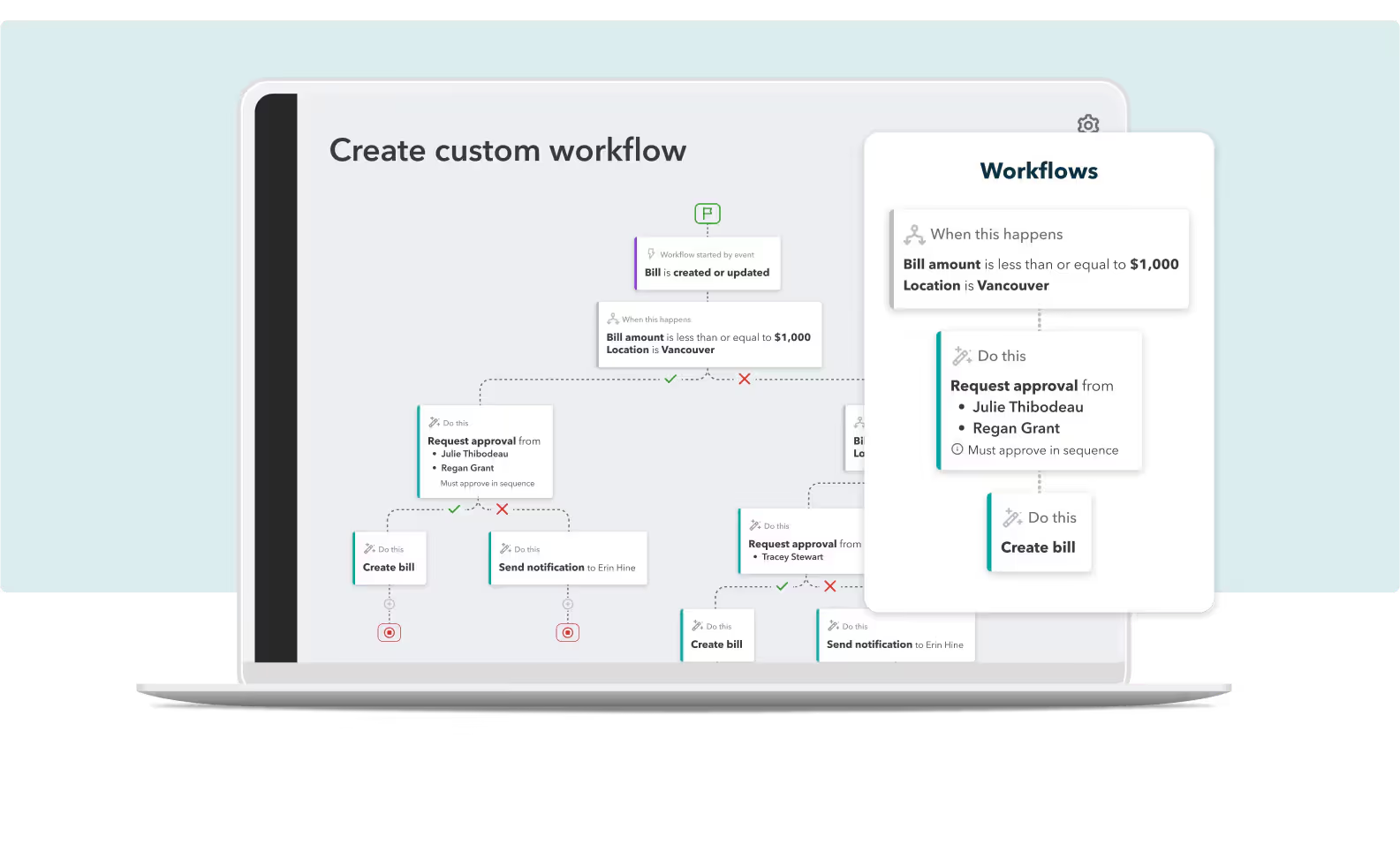
Larger businesses can use QuickBooks Online Advanced, a relatively new addition to the collection that includes workflows, automation, and cashflow management in the feature set.
QuickBooks Solopreneur
QuickBooks Solopreneur is a product created specifically for single-person businesses such as freelancers, gig workers, and sole proprietors who need basic financial management without the complexities of full accounting software.
It focuses on simple income and expense tracking, receipt capture, invoicing, and self-employment tax tools.
There are two pricing plans for this product for $20 and $38 per month.
This tool is useful, for example, for an independent photographer to categorize project-related expenses, track mileage, send invoices to clients, and generate tax-ready summaries for quarterly estimated payments.
QuickBooks Payroll
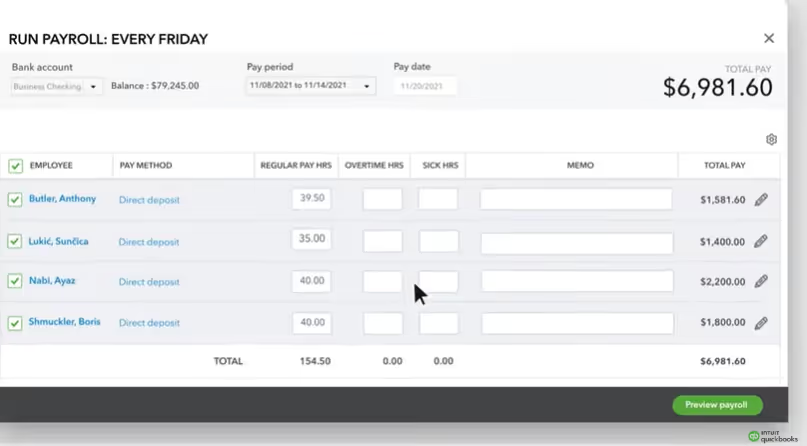
QuickBooks Payroll provides automated payroll processing, tax calculation and filing, direct deposit, benefits administration, and limited HR tools.
Although it can be used as a stand-alone product, this feature also exists as an add-on if you’re already using QuickBooks Online or QuickBooks Online Advanced.
It is available in Core, Premium, and Elite and ranges from $88 to $203 per mont.
QuickBooks Payroll offers tax penalty protection, where it covers up to a specified amount if payroll tax penalties occur. The system also provides full-service tax handling by automatically calculating, filing, and paying payroll taxes, supported by an accuracy guarantee.
The platform allows employee payments through same-day direct deposit, you can also automate payroll runs, reducing manual entry and saving time on recurring pay cycles.
The system also includes e-filing for 1099 forms, so you can manage contractor compliance efficiently and at no additional filing cost.
You can use this product if you have a small businesses with employees, if you need tax-compliant payroll processing, or require HR support tools.
For example, a small restaurant with 15 hourly employees could use QuickBooks Payroll Premium to run bi-weekly payroll, track tips and overtime, automatically file federal and state payroll taxes, and store employee documentation.
QuickBooks Contractor Payments
QuickBooks Contractor Payments is designed for businesses that rely heavily on independent contractors.
It allows contractor onboarding, automated payments, secure collection of W-9 information, and simplified 1099 filing at year-end. This product helps to lighten the administrative load of managing contract-based workforces.
There are four subscription plans available that range from $15 to $88 per month.
It’s a good product for marketing agencies, construction firms, event companies, property managers, and organizations that hire multiple freelancers.
For example, a small marketing firm that works with remote freelance designers and video editors uses Contractor Payments to send direct deposits, track payment history, and automatically generate 1099s during tax season.
QuickBooks Time
QuickBooks Time (formerly TSheets) is a time-tracking and workforce management tool that integrates with QuickBooks payroll and accounting products.
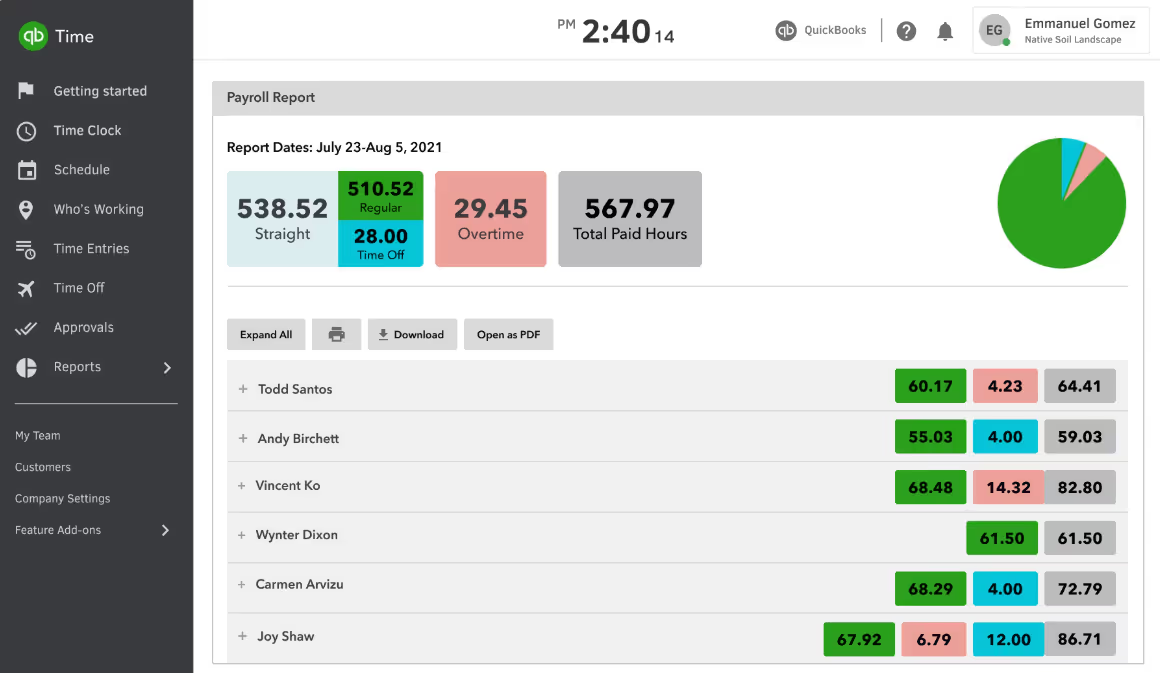
QuickBooks Time offers simple timesheet management, where you can review and approve multiple employee timesheets. This gives managers control over recording hours and helps ensure accuracy before payroll is processed.
Customizable reporting features offer insight into job costs, labor expenses, and productivity trends. This will help you plan payroll, estimate project budgets, and identify opportunities for improved profitability.
Team management features include GPS tools and optional geofencing, which remind employees to clock in or out when they arrive at or leave a job site.
QuickBooks time include a scheduling tool to allow managers to create and update schedules by shift or job. These schedules can be edited, published, and shared with teams instantly.
Finally, the platform offers task management controls, including recurring alerts for overtime, schedule adjustments, and timesheet approval deadlines and users will receive notifications.
This product is usually used by field service companies, construction crews, maintenance businesses, staffing agencies, and any business that tracks hourly labor, like some legal firms.
For example, if you have a landscaping business, with QuickBooks Time you can monitor team hours on various job sites, then the data syncs automatically with payroll.
QuickBooks Desktop
QuickBooks Desktop is QuickBooks' on-premise accounting software, designed for businesses that need a more controlled, local environment.
Desktop Enterprise supports up to 40 users, provides granular inventory controls, and supplies specialized modules such as advanced pricing, job costing, and industry-specific reporting.
However, QuickBooks Desktop is being phased out.
Intuit has formally implemented a service discontinuation policy, meaning that after May 31, 2026, Desktop products will lose access to payroll services, payments processing, online banking, and security updates.
While you may still be able to open an installed version locally after that date, running unsupported software carries increasing operational and security risk.
For this reason, QuickBooks Desktop is not a recommended long-term solution for most businesses. If you are currently using it, now is a good time to evaluate alternatives.
Industries that have historically used this product include manufacturing firms, wholesale distributors, construction companies, nonprofits, and businesses requiring advanced inventory management.
QuickBooks for Accountants
The final product is QuickBooks for Accountants.
Accounting tools for accountants needs to have more advanced features and must be able to hable multiple companies easily.
QuickBooks for Accountants, including QuickBooks Online Accountant (QBOA) and QuickBooks Ledger, is designed to help accountants and bookkeepers manage client books.
It provides real-time access to all client QuickBooks Online accounts from a single login, with accountant-only tools for reviewing, adjusting, and managing transactions.
The platform supports automation of accounting tasks, bank and app integrations, and project-level tracking of income, expenses, time, and labor, allowing you to provide your clients insight and reporting.
QuickBooks for Accountants also offers secure document sharing, client collaboration tools, and pricing discounts for clients, making it a comprehensive solution for managing multiple clients efficiently.
Note: At the time this article was written, Black Friday deals were posted, however, the original prices were added. Not the Black Friday deals.
Who is QuickBooks for?
Except for QuickBooks Online Advanced, QuickBooks is aimed mostly for small businesses, including freelancers and micro businesses.
Service businesses, retailers, contractors, manufacturers, and nonprofits regularly use QuickBooks.
QuickBooks provides adequate support for most small business industries, with specialized desktop editions for contractors, nonprofits, manufacturing, and retail.
QuickBooks is suitable for businesses with straightforward to moderately complex accounting needs.
However, if your company requires advanced financial consolidation, audits or multi-entity structures yo may need a more specialized platform.
Note that QuickBooks Desktop, previously a popular choice for businesses preferring on-premise software, is being phased out. Businesses currently relying on it should plan their migration ahead of the May 2026 service discontinuation deadline.
What Do Users Think?
As we mentioned at the start of this article, QuickBooks is a widely used brand, so there is a lot of information from actual users.
Many users appreciate the ease of invoicing, bank reconciliation, and real-time cloud access.
However, reviews also highlight consistent concerns, including customer support responsiveness, frequent pricing increases, and occasional technical glitches.
In addition, some long-term users express frustration with the gradual discontinuation of legacy desktop versions and the push toward cloud products.
✔️ Pros
All QuickBooks products integrate seamlessly with one another
A good option if you work with multiple vendors
Straightforward billing and invoicing
✖️ Cons
Pricing scales quickly when adding products
Subscription can be confusing
Lacks advanced features like automated bookkeeping, multi-currency and multi-company accounting or scalable general ledger among other.
Not very scalable
QuickBooks Desktop is being discontinued: after May 31, 2026, payroll, payments, online banking, and security updates will stop working
Is QuickBooks the Best Choice?
QuickBooks is a strong choice for many small businesses, especially if you cannot afford a dedicated in-house accountant or require an affordable, all-in-one bookkeeping system.
It performs well with basic bookkeeping, invoicing, and has a pretty extensive list of products that integrate well with one another.
However, QuickBooks may not be the optimal solution for more complex financial organizations, including CPA firms, multi-entity structures, and family offices.
If you have a CPA or family office with sophisticated accounting workflows, Eleven might be a better choice because it is a solution built specifically for accountants and is highly scalable.
Additionally, it offer:
Automated bookkeeping
Multi-company and multi-currency accounting
A universal tax engine
Analytical accounting
If you’re ready to know more, book a demo a find out which accounting software will meet your needs.
Christina Miranda Porras is a bilingual content writer, translator, and editorial specialist working across English and Spanish. With a background in audiovisual translation and SEO-focused writing, she specializes in research-driven content, editorial clarity, and multilingual communication. At Eleven, she contributes to educational content focused on accounting technology, automation, and business operations, supporting editorial quality and content accessibility.








.avif)