7 Best Cloud-Based Accounting Solutions for Accounting Firms and CPA Practices (2026)
Last updated:
March 19, 2026 5:31 PM
10
min read


Written by
Noel Bouwmeester
Reviewed by
Noe Saglio
Bookkeeping Management Must-knows
Discover how modern bookkeeping management software and AI tools can prevent cashflow issues, boost accuracy, and help your business grow.

If you've ever hit the end of the month unsure whether your business is actually profitable, you're not alone. This guide breaks down the bookkeeping methods that keep businesses financially healthy, the habits that prevent costly mistakes, and how today's AI-powered software does the heavy lifting, so you can focus on growing.
In this article
Did you know that 82% of businesses fail because of poor cashflow management?
If you’re still trying to handle accounts for your business without bookkeeping management software; vulnerable to human error, you could be putting the success and growth of your business at risk.
What is Bookkeeping?
Bookkeeping is simply the record of your business's financial life. Every sale, purchase, receipt, and payment, captured accurately, consistently, and in one place.
Done well, it gives you something invaluable: a clear, real-time picture of where your money is coming from and where it's going.
That clarity is what lets you make confident decisions, stay on the right side of tax regulations across different jurisdictions, and plan for growth instead of just reacting to problems.
Done poorly, or not at all, the gaps add up fast. Missed entries, uncategorised expenses, and out-of-date records don't just create admin headaches. They quietly distort your cashflow picture until the month you're blindsided by it.
Many businesses still rely on spreadsheets to manage this, which works until it doesn't. Manual entry is slow, error-prone, and gives you no early warning system.
Modern bookkeeping software changes this equation significantly, automating the repetitive work, flagging discrepancies in real time, and freeing you up to focus on running your business rather than reconciling it.
Bookkeeping vs Accounting
The two are closely related, but they serve distinct roles. Bookkeeping is the foundation: the daily discipline of recording what happens financially. Accounting builds on that foundation to explain what it means.
Think of it this way. Your bookkeeper makes sure every transaction is captured, every ledger balanced, every payroll run on time. Your accountant takes those records and turns them into insight: financial statements, performance forecasts, and strategic advice that helps you make better decisions.
One keeps the machine running. The other tells you where to steer it.
The Role of a Bookkeeper vs. an Accountant
If bookkeeping and accounting are two sides of the same coin, the people who do them have very different day-to-day realities.
A bookkeeper lives in the detail. Their job is to make sure every transaction is recorded, every invoice tracked, every bank statement reconciled. They run payroll, manage receipts, and keep the accounting system current. It's precise, disciplined work, and when it's done right, you barely notice it.
An accountant zooms out. They take the clean records a bookkeeper produces and use them to tell a bigger story: preparing financial statements, filing tax returns, conducting audits, and advising on strategy. Where a bookkeeper ensures the numbers are correct, an accountant helps you understand what those numbers mean for your business.
In practice, many small businesses start with just bookkeeping and bring in an accountant at key moments, tax season, fundraising, or a period of rapid growth. The two roles are most powerful when they work together.
Types of Bookkeeping
Not all bookkeeping works the same way. The method that's right for your business depends on how complex your finances are, how much visibility you need, and sometimes, what the law requires. Here are the three approaches you'll encounter.
1. Single-entry bookkeeping
The simplest form. Each transaction is recorded once, as either income or an expense. Think of it like a personal bank statement: money in, money out, running total.
It's easy to manage and perfectly adequate for very small businesses or sole traders with straightforward finances. The trade-off is visibility. Single-entry gives you a snapshot of cashflow, but little else. You won't easily spot trends, identify unpaid obligations, or get a true picture of your financial health from it.
2. Double-entry bookkeeping
The global standard, and for good reason. Every transaction is recorded twice: once as a debit, once as a credit. A sale, for example, increases your revenue and increases your bank balance simultaneously.
This might sound like more work, and initially it is. But the payoff is a self-checking system. Because the books must always balance (Assets = Liabilities + Equity), errors and discrepancies surface quickly. It's more accurate, more auditable, and gives you a far clearer picture of your business's financial position at any given moment.
Most businesses, even small ones, use double-entry for precisely this reason.
3. Accrual bookkeeping
This is where bookkeeping starts to reflect reality more closely. Rather than recording transactions when cash moves, accrual bookkeeping records them when they are earned or incurred.
So if you invoice a client in March but don't get paid until May, that revenue goes into March.
If you receive stock in February but pay the supplier in April, that expense belongs to February. The timing of the cash is irrelevant; what matters is when the obligation or the earning occurred.
For businesses that offer payment terms, carry inventory, or buy on credit, this matters a great deal.
Without it, your books can look healthy one month and alarming the next, not because anything has changed, but because cash happened to move at the wrong time. Accrual accounting smooths that out and shows you what's genuinely happening financially.
It's also worth knowing that accrual accounting is required for any business that needs to comply with GAAP (Generally Accepted Accounting Principles), including all public companies.
The simpler alternative is cash basis bookkeeping, which records transactions only when money actually changes hands.
Many small businesses start here because it's intuitive and easy to manage. But as a business grows, the limitations of cash basis tend to show. Accrual gives you the accuracy to make decisions you can trust.
How to Manage Your Bookkeeping
Managing bookkeeping effectively requires structure, consistency, and the right tools. Here are the steps you should follow to successfully balance your books:
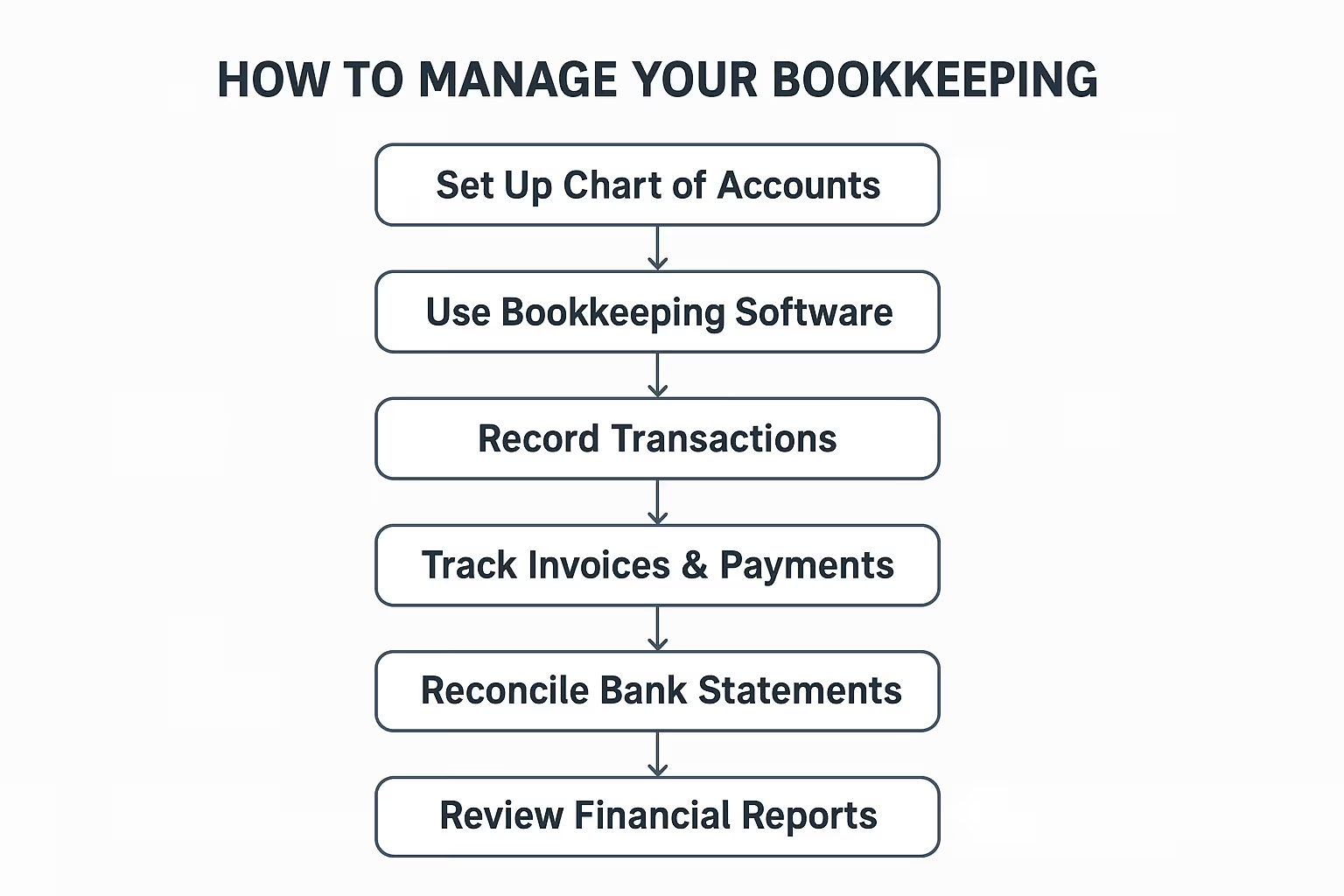
1. Set up a proper chart of accounts
Categorize your income, expenses, assets, and liabilities clearly. This provides the foundation for accurate financial reporting.
You need this framework first so all future transactions are categorized correctly.
2. Use bookkeeping tools and software
Automating bookkeeping saves time and reduces errors. Tools such as QuickBooks, Xero, and FreshBooks, simplify tasks like invoicing, payroll, and financial reporting.
For businesses that seek smart automation and efficient bookkeeping processes, Eleven offers AI-powered bookkeeping solutions designed to improve accuracy, save time, and scale with your business’ needs.

It’s best to set up your software early, right after defining your chart of accounts - this ensures automation and accurate data records from the start.
3. Record transactions regularly
Once your system and categories are ready, start entering or syncing transactions consistently.
Keep your records up to date by ensuring transactions are recorded daily or weekly, as delayed entries can lead to confusion and errors.
4. Track invoices and payments
After recording transactions, keep tabs on what’s owed and what’s paid to manage cashflow.
You can maintain a clear record of accounts receivable and payable with Eleven, to track cashflow efficiently.
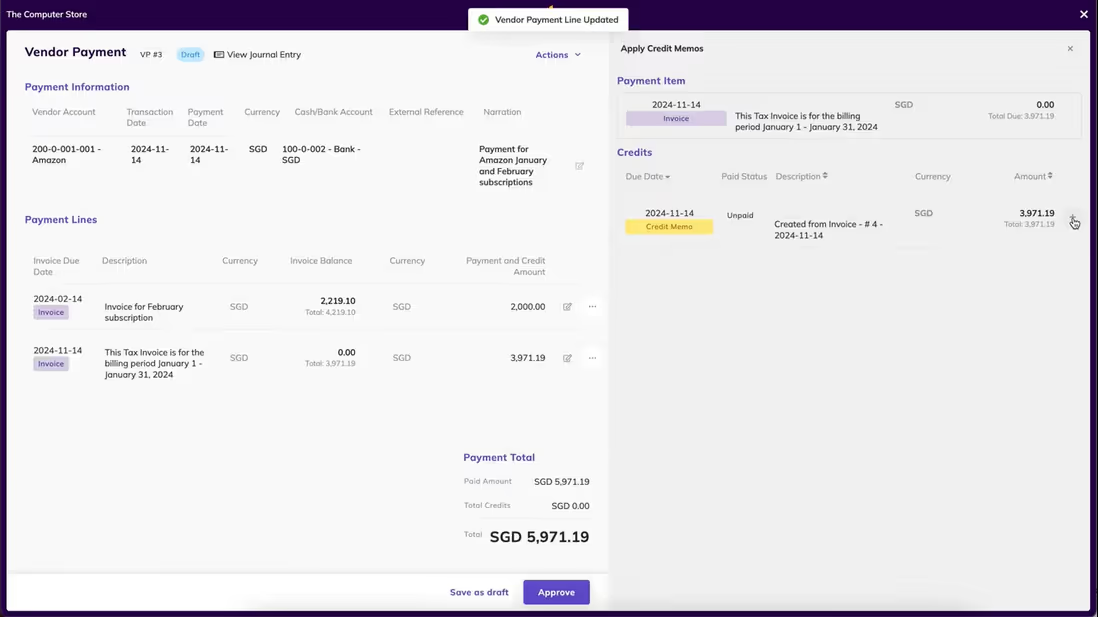
5. Reconcile bank statements
After transactions and payments are in, reconciliation ensures all records align with your bank accounts. Regularly match your books with bank statements to identify discrepancies early. Reconciliation helps maintain accuracy and detect fraud or mistakes.
6. Review financial reports regularly
Finally, analyze income statements, balance sheets, and cashflow reports monthly. This helps you understand financial trends and make informed business decisions.
Bookkeeping Management Must-haves
Choosing bookkeeping software isn't just about what works today.
It's about what will still work when your business is twice the size, operating in new markets, or managing a finance team rather than a spreadsheet. The features below aren't nice-to-haves. They're the foundation of a system you can actually rely on.
One thing worth deciding early: how much growth are you expecting, and how soon? If the answer is a lot, prioritise scalability from the start. Migrating to a new platform mid-growth is expensive, disruptive, and entirely avoidable if you choose the right tool upfront.
Here's what that tool should include:
General ledger and double-entry accounting
This is the engine. A proper chart of accounts and general ledger, built on double-entry accounting, means every transaction is correctly reflected across assets, liabilities, equity, income, and expenses, all in one place. Without this, reconciliation becomes guesswork. With it, your books are always internally consistent and audit-ready.
Accounts payable and receivable
You need a clear, live view of what you owe and what you're owed. Good software tracks bills and supplier payments on one side, and customer invoices and collection schedules on the other. Cashflow problems rarely come out of nowhere. Usually they're visible in the receivables, if you're looking.
Bank integrations and reconciliation
Manual data entry is where errors are born. Your software should sync directly with your bank and credit card accounts, import transaction feeds automatically, and reconcile them against your books without you having to lift a finger. The less human intervention in this process, the more accurate your records will be.
Expense tracking and invoice management
Receipts, categorisation, invoicing, payment tracking, automated reminders. These are the daily mechanics of bookkeeping, and they should run smoothly and largely on their own. Look for software that lets you capture receipts on the go, categorises expenses intelligently, and chases overdue invoices without you having to remember to do it.
Tax and compliance tools
Tax gets complicated fast, particularly if you're working across multiple jurisdictions or dealing with VAT and GST. Your software should handle tax deadlines, generate compliant reports, maintain a clear audit trail, and adapt to the rules of wherever you're operating. Compliance isn't optional, and manually tracking it across markets is a risk no business should be taking.
Automation
This is where modern bookkeeping software earns its keep. Recurring invoices, scheduled transactions, auto-categorisation, OCR receipt scanning, payment reminders: all of it can run in the background, consistently and without error. The goal isn't just to save time. It's to remove the category of tasks that fall through the cracks when you're busy, which is exactly when they tend to matter most.
Is Bookkeeping Management Software the Right Way to Go?
The short answer is yes. But it's worth understanding why.
Manual bookkeeping doesn't just cost you time. It costs you accuracy, and accuracy is what every good financial decision is built on.
The longer you manage your books by hand, the more opportunities there are for errors to compound quietly in the background, until they surface at the worst possible moment.
Software removes that risk. It automates the repetitive work, keeps your records current without you having to chase them, and gives you a clear view of your financial position whenever you need it. Not just at month end. Not just at tax time. Always.
For businesses that are growing, or planning to, that kind of visibility isn't a luxury. It's what lets you move with confidence rather than guesswork.
Eleven is built for exactly this. AI-powered, easy to use, and designed to scale with your business from the first invoice to the hundredth employee. If you've been putting off making the switch, there's no better time to see what a smarter system feels like.
Start your free test drive with Eleven
FAQs
What is bookkeeping practice management software?
Bookkeeping practice management software is a specialized tool designed to help firms, bookkeepers and accountants manage their day-to-day business, not just the accounting for clients, but the practice itself. It combines workflow, client management, deadlines, documents, billing, reporting and more, in one platform.
What is property management bookkeeping software?
Property management bookkeeping software is a tool designed for landlords, property managers, real estate firms, residential or commercial leasing operators, etc., to handle the financial and accounting side of managing properties. It combines regular bookkeeping and accounting features with property-specific workflows like rent, leases, maintenance and owner statements.
How to manage small business bookkeeping?
To manage small business bookkeeping, you should use accounting software to track income and expenses and establish a routine for recording transactions and reconciling your accounts. Diligently organize receipts, understand your tax obligations, and create regular financial reports to monitor your business's health with Eleven.
Can I teach myself bookkeeping?
While becoming a professional bookkeeper does require training, learning how to use bookkeeping software to manage your own business’s finances is quite accessible.
Using a tool like Eleven is not just easy to use but is also a financially viable solution for companies who do not have the budget for a full-time bookkeeper. Furthermore, it can go further than just bookkeeping and also provide expert interpretations and insights, comparable to that of an accountant.
Will AI replace bookkeepers?
No, but it will change what the job looks like.
AI handles the repetitive work well: categorising transactions, scanning receipts, reconciling accounts. That frees bookkeepers to focus on what software can't replicate, namely judgement, context, and client relationships.
The bookkeepers who thrive will be the ones who embrace these tools and use the time they save to move into more advisory work.
For a deeper look, read our full breakdown at runeleven.com/blog/will-ai-replace-accountants.
Guides
✔

Noel Bouwmeester
Noel Bouwmeester is an SEO content strategist and B2B SaaS writer focused on organic growth, search visibility, and AI-era content discovery. He has contributed to SEO and content marketing initiatives for companies including lempire and lemlist, helping support large-scale organic traffic growth through search-focused content strategies. At Eleven, he contributes educational SEO content focused on accounting technology, automation, and AI-driven business workflows.
.avif)